Search

Showing posts with label Google Maps. Show all posts

Wednesday, November 22, 2017

Look Out for New Badges on Google Maps #LocalGuides


Finally Google Maps launch new feature for Local Guides user as the achievement. The previous feature, Leveling ( 1 - 10) and point rewards for your activity as like upload photo, upload video (android user), reviews, ratings, edit, place added, facts checked, answers and Q&A. Now on your Local Guides Profile you can find the special badge achievement.


New achievement badges can unlock by the Google Maps Local Guides with the criteria:

Reviewer: You’ll earn this badge by writing detailed reviews that help people decide where to go.


Photographer: This badge is for sharing photos of places, so others can see the world on Google Maps.


Trailblazer: Here’s the badge for exploring. Earn it by being the first to add, review, or take a photo of a place.


Fact Finder: Earn this badge by checking facts, making edits, and answering simple questions about places to help people find the right information on Google Maps.


By sharing more, you can get upgrades for each one. For example, a Novice Photographer can become an Expert Photographer, and then reach legendary status as a Master Photographer.. Your past contributions will be factored in too, so some of you may have already reached that status!

This feature is rolling out over the next few weeks. To see if it’s on your device right now, go to “Your contributions” on Google Maps for Android or iOS. There, you’ll see your progress toward each badge. Tap each one to see how to earn the more advanced version of your new badge.

Go to "Your contributions" to see if you have one!

Sunday, November 6, 2016

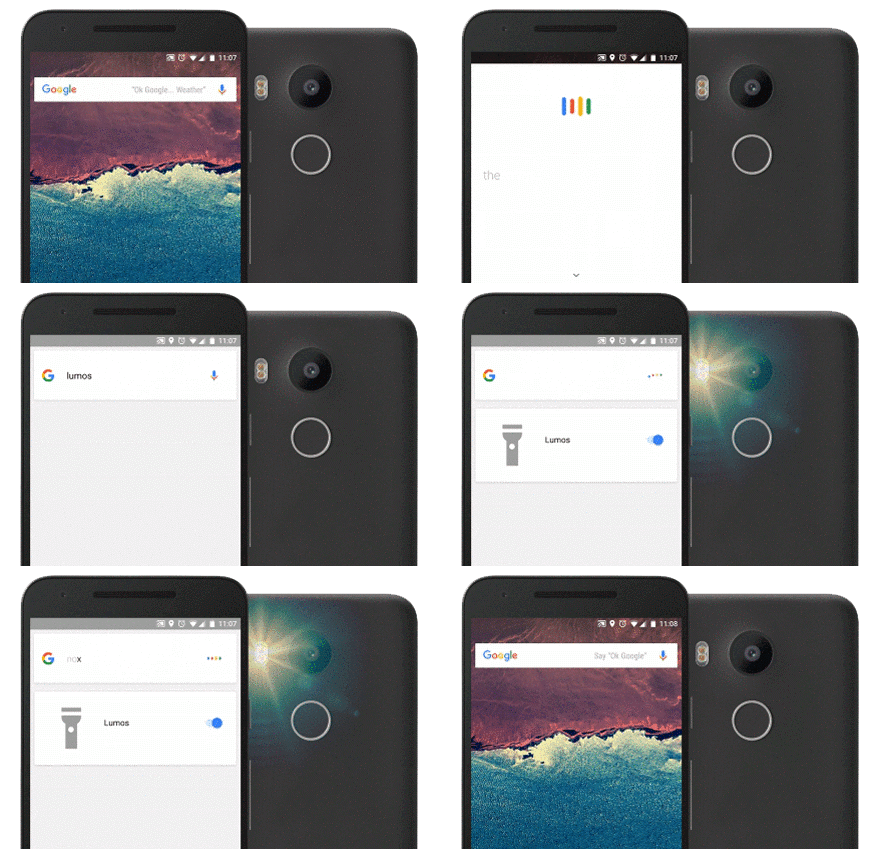
Android User Can Now Cast A Spell From The Harry Potter World


Now anyone can try their hand at magic with a little help from Google and the new Warner Bros. Pictures film set in J.K. Rowling’s Wizarding World, “Fantastic Beasts and Where to Find Them.” Taking place decades before Harry Potter first arrives at Hogwarts, “Fantastic Beasts” follows the adventures of magizoologist Newt Scamander in a whole new era of the wizarding world — New York in 1926.

If you want to try being a wizard, try casting spells on your Android phone: Just say “Ok Google” followed by “Lumos” or “Nox” to turn your flashlight on and off. Try “Silencio” to silence the ringer and notifications.


You can also explore the world of “Fantastic Beasts and Where to Find Them” with Google Street View. Visit New York in 1926 as brought to life in the film, as well as the real locations today. Fans can visit MACUSA (Magical Congress of the USA); Steen National Bank, where Newt first meets Jacob Kowalski; the underground speakeasy The Blind Pig; and the magical apartment of Tina and Queenie Goldstein, two of the film’s key characters.


Source: Google Blog - Fantastic Beasts

Saturday, March 26, 2011

Google Maps for BlackBerry New Update V.4.5.3


bagi pengguna "google maps for mobile" khususnya yang menggunakan blackberry, kali ini silahkan update aplikasi "google maps for blackberry" ke versi yang lebih baru yakni versi v.4.5.3.

tidak ada perubahan / log change untuk update kali ini tetapi bagi pengguna aplikasi mobile ini sebaiknya update di link http://m.google.com/maps sesuai jenis perangkat yang digunakan.

aplikasi blackberry ini adalah bagian dari aplikasi "google maps for mobile" yang juga tersedia untuk perangkat android, iphone, nokia s60 dan windows. aplikasi peta dari google tersebut paling lengkap fiturnya di perangkat android dibanding jenis yang lainnya. perbedaan secara lengkapnya dapat dilihat di halaman http://www.google.com/mobile/maps/