Search

Showing posts with label Google Mobile App. Show all posts

Sunday, November 6, 2016

Android User Can Now Cast A Spell From The Harry Potter World


Now anyone can try their hand at magic with a little help from Google and the new Warner Bros. Pictures film set in J.K. Rowling’s Wizarding World, “Fantastic Beasts and Where to Find Them.” Taking place decades before Harry Potter first arrives at Hogwarts, “Fantastic Beasts” follows the adventures of magizoologist Newt Scamander in a whole new era of the wizarding world — New York in 1926.

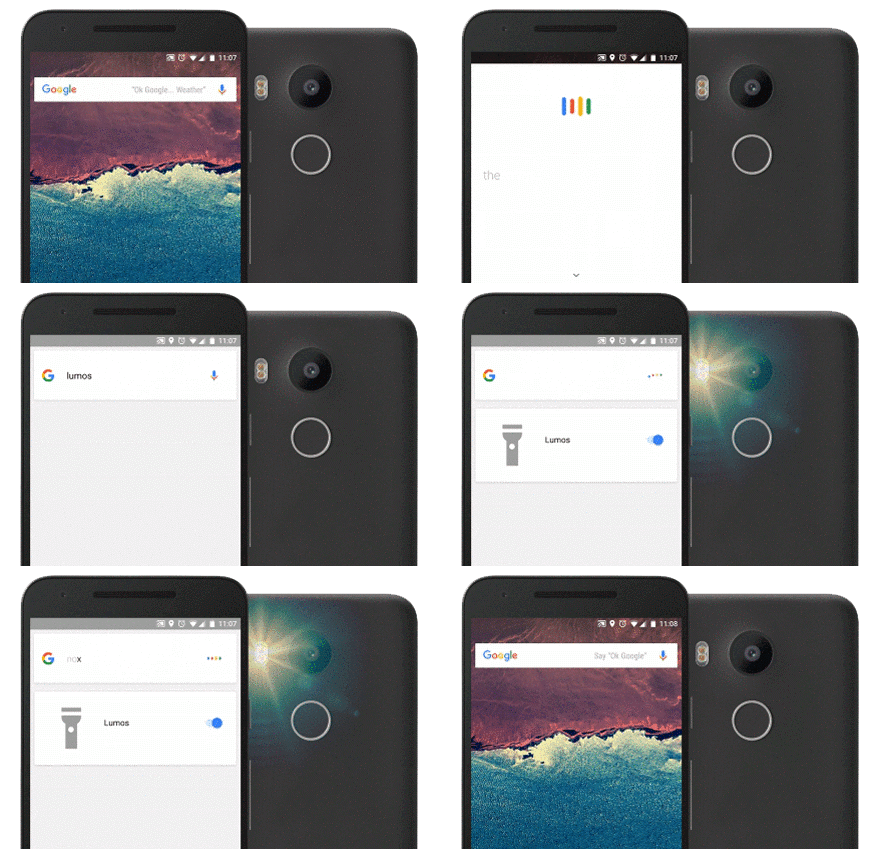
If you want to try being a wizard, try casting spells on your Android phone: Just say “Ok Google” followed by “Lumos” or “Nox” to turn your flashlight on and off. Try “Silencio” to silence the ringer and notifications.


You can also explore the world of “Fantastic Beasts and Where to Find Them” with Google Street View. Visit New York in 1926 as brought to life in the film, as well as the real locations today. Fans can visit MACUSA (Magical Congress of the USA); Steen National Bank, where Newt first meets Jacob Kowalski; the underground speakeasy The Blind Pig; and the magical apartment of Tina and Queenie Goldstein, two of the film’s key characters.


Source: Google Blog - Fantastic Beasts

Thursday, January 14, 2010

Search Your BlackBerry Email And Contacts With New Google Mobile App


Anda salah satu pemilik perangkat BlackBerry dan pernah menginstal aplikasi Google Mobile App? Buruan download versi baru 3.5.48 yang baru dirilis. Fitur baru yang ada di versi ini adalah pencarian kontak langsung dari Google Search yang disimpan di Aplikasi Contact BlackBerry dan memungkinkan untuk memanggil atau kirim SMS atau kirim email langsung dari aplikasi ini.

Pertama kali download terlebih dahulu via OTA di http://m.google.com pada browser BlackBerry dan ikuti petunjuk yang ada. Setelah terinstal Google Mobile App ini akan terdapat kotak pencarian, ketik nama yang diinginkan maka akan muncul drop down berupa suggestion yang dapat dipilih yang merupakan gabungan suggestion contact dan sugenstion pencarian di web. Arahkan cursor ke contact kemudian tekan tombol yang terdapat logo BlackBerry di perangkat, akan keluar menu "Call", "Select", Google Home", "Help", "Option" dan "Exit". Pilih aja "Call" jika ingin langsung menelepon atau klik "Select" dengan pilihan "Call", "SMS", "Email" atau "Cancel".

Pencarian contact menggunakan aplikasi ini khusus untuk BlackBerry dengan OS 4.2 atau lebih tinggi sedangkan untuk pencarian alamat email khusus untuk BlackBerry dengan OS 4.5 atau lebih tinggi.

Selain adanya tambahan fitur ini, Google Mobile App Versi 3.5.48 juga terdapat beberapa perbaikan termasuk kemampuan koneksi WIFI untuk akses internet melalui aplikasi ini. Google Mobile App banyak memiliki fitur lain seperti Search, Mail, Map, News, ReaderCalendar, Docs, Photos, Sync dan Notebook. Semua fitur dapat diaktifkan secara terpisah seperti Mail (Gmail) dan Maps (Google Map).

Screenshot: