Search

Showing posts with label MacBook. Show all posts

Tuesday, June 8, 2021

#WWDC21 Keynote: macOS Monterey - Adds New Ways to Connect with Friends and Family.


Apple previewed macOS Monterey, the latest version of the world’s most advanced desktop operating system. macOS Monterey comes with new ways for users to connect, get more done, and work more fluidly across their Apple devices. SharePlay, a new feature in FaceTime, lets users share experiences together, and Shared with You makes it easy to discover and enjoy content shared through Messages right in Photos, Safari, Apple Podcasts, Apple News, and the Apple TV app. A major update to Safari features a gorgeous streamlined tab bar and powerful tab organization with Tab Groups, Shortcuts comes to the Mac to automate everyday tasks, and Focus helps users stay on task and reduce distractions. Additionally, Universal Control and AirPlay to Mac are new Continuity features that offer more ways to work effortlessly across Apple devices. macOS Monterey will support the broadest lineup of Macs in history, including the latest iMac, MacBook Air, 13-inch MacBook Pro, and Mac mini, as well as Apple’s Intel-based Macs. 


Getting More Done with Mac

New tools in macOS Monterey are designed to help users get more done, stay focused, and collaborate:

  • Already the world’s fastest browser, Safari now reimagines the browsing experience with a new tab design that lets users see more of the page as they scroll. A new tab bar takes on the color of the webpage and combines tabs, the tool bar, and the search field into a single compact design. Tab Groups offer a new way to easily save and manage tabs — great for planning trips, shopping, or storing the tabs users visit daily. Tab Groups also sync across Mac, iPhone, and iPad, so users can continue their project from anywhere and easily share tabs with friends and family.

  • Shortcuts arrives on the Mac to help users automate everyday tasks and achieve peak productivity. Just like on iPhone and iPad, Shortcuts on Mac lets users quickly accomplish tasks with the apps they use the most. With a rich gallery of pre-built actions designed just for Mac, users can instantly share files, make animated GIFs, and more. Power users looking to take things further can use the Shortcuts Editor on Mac to customize shortcuts to match their workflows. Shortcuts is integrated throughout macOS, including the menu bar, Finder, Spotlight, and even hands-free with Siri — making it easy to run shortcuts no matter which app the user is in. Users can easily import existing Automator workflows into Shortcuts and be up and running right away.


  • New features in Notes help users stay organized, collaborate, and create notes from anywhere. Quick Note is a new way for users to jot down notes on any app or website systemwide, making it easy to capture thoughts and ideas wherever inspiration strikes. Users can also add links from an app to their Quick Note to create context, even on a website in Safari or an address in Maps. As users work through projects in Notes with friends or colleagues, they can add mentions, see everyone’s edits in the new Activity View, and categorize their Notes with tags to quickly and easily find them in the new Tag Browser and in tag-based Smart Folders.


  • With Focus, Mac users can stay in the moment by automatically filtering out notifications unrelated to their current activity. Users can signal their status to let others know when they are focusing and not available. When a user has Focus set on one device, it automatically sets across their other devices and can be customized based on their current activity — whether they are preparing for a presentation or wrapping up an assignment for school.


All-New Ways to Stay Connected

macOS Monterey provides meaningful new ways to connect and enjoy time with friends, family, and colleagues:

  • FaceTime now includes a suite of new audio and video features that make calls feel more natural and lifelike. With spatial audio, voices in a FaceTime call sound like they are coming from where the person is positioned on the screen, while Voice Isolation ensures the user’s voice is crystal clear and uses machine learning to eliminate background noise, and Wide Spectrum allows all the sound in the area to come through so participants can hear everything. Portrait mode taps into the Apple Neural Engine in the M1 chip to blur the user’s background for a stunning video effect, and a new Grid View shows participants in same-sized tiles.


  • SharePlay is a powerful set of system features that enables users to have shared experiences while on a FaceTime call. Users can share their favorite music, TV shows, movies, projects, and more with friends and family in real time — kicking off a shared listening party, watching movies and shows, collaborating in apps through screen sharing, and more. With an API built for easy adoption, third-party developers can bring their own apps right into FaceTime.


  • Shared with You makes it easy to locate and enjoy all the great content that’s shared through Messages, including photos, videos, articles, and more, right from a Shared with You tab within Photos, Safari, Apple Podcasts, Apple News, and the Apple TV app.

New Ways to Work Across Apple Devices

Working across Apple devices is now better than ever with new Continuity features:

  • Universal Control lets users work with a single mouse and keyboard and move between Mac and iPad for a seamless experience, with no setup required. Users can even drag and drop content back and forth between devices — great for sketching a drawing with Apple Pencil on iPad and placing it into a Keynote slide on the Mac.

  • With AirPlay to Mac, users can play, present, and share just about anything — from the latest movies and games to vacation photos and presentations — from their iPhone or iPad right to their Mac’s stunning Retina display. The Mac’s high-fidelity sound system can also be used as an AirPlay speaker, so users can play music or podcasts on their Mac, or use their Mac as a secondary speaker for multiroom audio.

Additional New Features of macOS Monterey

  • With the new interactive globe in Maps and an amazing, immersive, and detailed city experience, users can enjoy new ways to navigate and explore the natural beauty of the Earth on the Mac’s large, gorgeous display.
  • Live Text uses on-device machine learning to detect text in photos, including phone numbers, websites, addresses, and tracking numbers, so users can copy and paste, make a phone call, open a website, and easily find more information. Visual Lookup also uses machine learning to help users discover and learn about animals, art, landmarks, plants, and more in photos. These features work across macOS, including in apps like Photos, Messages, and Safari.

  • iCloud+ combines everything users love about iCloud with new premium features, including Hide My Email, expanded HomeKit Secure Video support, and an innovative new internet privacy service, iCloud Private Relay, at no additional cost.
  • AirPods Pro and AirPods Max deliver a theater-like experience with spatial audio on Macs with the M1 chip.

  • Privacy features like Mail Privacy Protection let users choose whether emails can collect information about their Mail activity, and the Mac recording indicator now shows which app is accessing the Mac’s microphone.


  • New accessibility features let anyone add alternative image descriptions right from Markup, and improved Full Keyboard Access and new cursor customization options provide more flexibility when navigating Mac.

Source: Apple


Wednesday, November 11, 2020

Apple Event November 10, 2020: macOS Big Sur - Doing It All, in All New Ways


All new Macs come with Big Sur, the latest version of the world’s most advanced desktop operating system. Big Sur introduces a beautiful redesign that is entirely new yet instantly familiar, and powerful updates to apps including Safari, Messages, and Maps. Big Sur is engineered, down to its core, to take full advantage of all the capability and power of M1, delivering a massive boost in performance, astonishing battery life, and even stronger security protections. With M1, things users do every day feel noticeably faster and smoother. Just like iPhone and iPad, the Mac now instantly wakes from sleep. Browsing with Safari — which is already the world’s fastest browser — is now up to 1.5x speedier at running JavaScript and nearly 2x more responsive.

With Big Sur and M1, Mac users can run a greater range of apps than ever before. All of Apple’s Mac software is now Universal and runs natively for M1 systems. Existing Mac apps that have not been updated to Universal will run seamlessly with Apple’s Rosetta 2 technology. And iPhone and iPad apps can now run directly on the Mac. Additionally, the foundations of Big Sur are optimized to unlock the power of M1, including developer technologies from Metal for graphics to Core ML for machine learning.


Key Features and Enhancements

Updated menu bar

The menu bar is now taller and more translucent, allowing your desktop picture to extend from edge to edge. Words lighten or darken based on the color of your desktop picture. And pull-down menus are larger, with more space between the lines to make everything easier to read.

Floating Dock

The redesigned Dock is lifted from the bottom of your display and is more translucent, allowing your desktop wallpaper to shine through. And app icons are all-new and even easier to recognize.

New icons for apps

App icons have been redesigned to feel both familiar and fresh. Icons have a uniform shape but retain the stylistic touches and details that give Mac its character.

Lighter window appearance

Windows have a lighter, more spacious appearance that makes them cleaner and easier to work with. Additional translucency and rounded edges designed to match the radii of Mac create a cohesive look and feel throughout macOS.

Redesigned sheets

Sheets in apps have been completely redesigned, removing borders and bezels to put the focus on your content. They automatically dim the background and scale into the center of the app.

New and updated sounds

System sounds are all-new and even more pleasing to the ear. The new system alerts were created using snippets of the originals, so they sound familiar.

Full-height sidebars

A new look for app sidebars makes it easier to find what you want and gives you more space to get things done. Easily track your Mail inbox, access Finder folders, and organize Photos, Notes, Stocks, and more.

New symbols throughout macOS


New symbols in toolbars, sidebars, and controls bring clarity and consistency across apps, helping you immediately recognize where to click. When apps share common tasks — like viewing the inbox in Mail or Calendar — they share the same symbol. There are also localized versions of symbols with numbers, letters, and dates to match your system language.

Control Center

Designed just for Mac, the new Control Center consolidates your favorite menu bar items into a single place to give you instant access to the controls you use most. Just click the Control Center icon in the menu bar and adjust Wi-Fi, Bluetooth, AirDrop, and other settings — without opening System Preferences.

Updated Notification Center

A redesigned Notification Center puts all your notifications and widgets into a single, dedicated column. Notifications are automatically sorted by most recent, and redesigned Today widgets deliver information at a glance.


Safari:Customizable start page

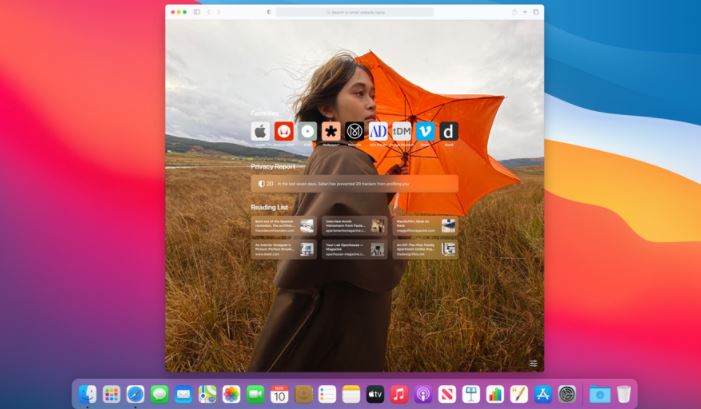
Customize the new start page to make it your own. You can set a background image and select new sections to display on the start page — including Favorites, Siri Suggestions, Reading List, iCloud Tabs, and even a Privacy Report.


Safari: Improved performance

Safari was already the fastest desktop browser — and now it’s even faster. Safari loads frequently visited sites 50 percent faster on average than Chrome.

Privacy information on the App Store

A new section on each app’s page on the App Store helps you understand the privacy practices of the app before you download it.9 It’s similar to the way nutrition labels help you understand what’s in food before you buy it.


AirPods: Automatic device switching

AirPods automatically switch between your iPhone, iPad, and Mac paired to the same iCloud account - making it even easier to use your AirPods with your Apple devices.10 When you turn to your Mac, a pop-up banner helps you seamlessly switch the audio over. Automatic device switching works for all Apple and Beats headphones featuring the Apple H1 headphone chip.

Optimized Battery Charging

Optimized Battery Charging is designed to reduce the wear on your battery and improve its lifespan by ensuring that your Mac notebook is fully charged when unplugged. Optimized Battery Charging learns your daily charging routine and activates only when your Mac predicts that it will be connected to a charger for an extended period of time.

Home status

A new visual status at the top of the Home app gives you a summary of accessories that require your attention, have important status changes to share, or can be quickly controlled.

Music: Listen Now

The new Listen Now tab is designed for playing and discovering your favorite music, artists, interviews, and mixes all in one place. Listen Now starts with a summary of your Top Picks across your music interests. As you play, Apple Music12 learns what you love and provides new suggestions.

Photos: Expanded video editing capabilities

Adjustments, filters, and cropping are now supported for video editing so you can rotate, increase exposure, or even apply filters to your videos.

You can install macOS Big Sur on any of these Mac models based on this list

Source: Apple

Follow us on Twitter @PC_holic


Apple Event November 10, 2020: Mac mini - Staggering Performance and an Ultracompact Design


Apple introduced a new MacBook Air, 13-inch MacBook Pro, and Mac mini powered by the revolutionary M1, the first in a family of chips designed by Apple specifically for the Mac. By far the most powerful chip Apple has ever made, M1 transforms the Mac experience. With its industry-leading performance per watt, together with macOS Big Sur, M1 delivers up to 3.5x faster CPU, up to 6x faster GPU, up to 15x faster machine learning (ML) capabilities, and battery life up to 2x longer than before. And with M1 and Big Sur, users get access to the biggest collection of apps ever for Mac. With amazing performance and remarkable new features, the new lineup of M1-powered Macs are an incredible value, and all are available to order today.

Staggering Performance and an Ultracompact Design

Mac mini is Apple’s most versatile computer, and now with M1, it packs a staggering amount of performance and incredible new features in such a compact design. M1 brings an 8-core CPU with up to 3x faster performance than the previous generation, dramatically accelerating demanding workloads, from compiling a million lines of code to building enormous multitrack music projects. An 8-core GPU delivers up to a massive 6x increase in graphics performance, allowing Mac mini to tackle performance-intensive tasks like complex 3D rendering with ease. ML workloads also take a quantum leap forward with up to 15x faster performance over the previous generation. And when compared to the best-selling Windows desktop in its price range, the Mac mini is just one-tenth the size, yet delivers up to 5x faster performance.


When compared to the previous generation, the M1-powered Mac mini can:

  • Compile code in Xcode up to 3x faster. 
  • Play a graphics-intensive game like “Shadow of the Tomb Raider” with up to 4x higher frame rates. 
  • Render a complex timeline in Final Cut Pro up to 6x faster. 
  • Take music production to new levels by using up to 3x as many real-time plug-ins in Logic Pro.
  • Magically increase the resolution of a photo in Pixelmator Pro up to 15x faster. 
  • Utilize ML frameworks like TensorFlow or Create ML, now accelerated by the M1 chip.


Mac mini also features an advanced thermal design to sustain its breakthrough performance while staying cool and quiet, support for up to two displays including Apple’s Pro Display XDR in full 6K resolution, and Wi-Fi 6 for faster wireless performance and the Secure Enclave in M1 for best-in-class security. 

With M1 and Big Sur, Mac mini represents a massive shift in what an ultrasmall desktop can do. Far more versatile and far more capable than ever, Mac mini is now available for just $699, $100 less than the previous-generation quad-core model.

Source: Apple Newsroom

Follow me on Twitter @PC_holic


Apple Event November 10, 2020: 13-inch MacBook Pro - Even More Powerful and Even More Pro


Apple introduced a new MacBook Air, 13-inch MacBook Pro, and Mac mini powered by the revolutionary M1, the first in a family of chips designed by Apple specifically for the Mac. By far the most powerful chip Apple has ever made, M1 transforms the Mac experience. With its industry-leading performance per watt, together with macOS Big Sur, M1 delivers up to 3.5x faster CPU, up to 6x faster GPU, up to 15x faster machine learning (ML) capabilities, and battery life up to 2x longer than before. And with M1 and Big Sur, users get access to the biggest collection of apps ever for Mac. With amazing performance and remarkable new features, the new lineup of M1-powered Macs are an incredible value, and all are available to order today.

The 13-inch MacBook Pro is Apple’s most popular pro notebook. Students use it to power through college, and pros use it to channel their creativity. With the M1 chip and Big Sur, the 13-inch MacBook Pro becomes even more powerful and even more pro. The 8-core CPU, when paired with the MacBook Pro’s active cooling system, is up to 2.8x faster than the previous generation, delivering game-changing performance when compiling code, transcoding video, editing high-resolution photos, and more. The 8-core GPU is up to 5x faster, allowing users to enjoy super smooth graphics performance whether they are designing a graphics-intensive game or a new product. And with M1, the 13-inch MacBook Pro is up to 3x faster than the best-selling Windows laptop in its class.3 ML is up to 11x faster, and for on-device ML tasks that use the Neural Engine, the new 13-inch MacBook Pro is now the world’s fastest compact pro notebook.4 With up to 17 hours of wireless web browsing and up to a staggering 20 hours of video playback, MacBook Pro delivers up to twice the battery life of the previous generation and the longest battery life ever on a Mac.


When compared to the previous generation, the M1-powered 13-inch MacBook Pro can:

  • Build code in Xcode up to 2.8x faster.
  • Render a complex 3D title in Final Cut Pro up to 5.9x faster. 
  • Fluidly design intricate game scenes in Unity Editor up to 3.5x faster. 
  • Perform ML tasks in Create ML up to 11x faster.
  • Separate out beats, instrumentals, and vocal tracks from a recording in real time in djay Pro AI, thanks to the amazing performance of the Neural Engine. 
  • Play back full-quality, 8K ProRes video in DaVinci Resolve without dropping a single frame. 
  • Compile four times as much code on a single charge, thanks to the game-changing performance per watt of the M1 chip.


Other new features in the new 13-inch MacBook Pro include studio-quality mics for super clear recordings and calls, and Apple’s latest camera ISP in the M1 chip enables sharper images and more detail in shadows and highlights on video calls. The new MacBook Pro also delivers best-in-class security with the Secure Enclave in M1 and Touch ID. And it features two Thunderbolt ports with USB 4 support to connect to more peripherals than ever, including Apple’s Pro Display XDR in full 6K resolution.


With its amazing performance and unbelievable battery life, combined with its gorgeous Retina display, Magic Keyboard, and 3-pound compact design, the new 13-inch MacBook Pro is the ultimate expression of what the M1 chip can do. And it is available for the same starting price of just $1,299, and $1,199 for education.


Tuesday, November 10, 2020

Apple Event November 10, 2020: Introducing The Next Generation of Mac - New MacBook Air


A new MacBook Air, 13-inch MacBook Pro, and Mac mini powered by M1, Apple’s breakthrough chip for the Mac

On a momentous day for the Mac, Apple today introduced a new MacBook Air, 13-inch MacBook Pro, and Mac mini powered by the revolutionary M1, the first in a family of chips designed by Apple specifically for the Mac. By far the most powerful chip Apple has ever made, M1 transforms the Mac experience. With its industry-leading performance per watt, together with macOS Big Sur, M1 delivers up to 3.5x faster CPU, up to 6x faster GPU, up to 15x faster machine learning (ML) capabilities, and battery life up to 2x longer than before. And with M1 and Big Sur, users get access to the biggest collection of apps ever for Mac. With amazing performance and remarkable new features, the new lineup of M1-powered Macs are an incredible value, and all are available to order today.

“The introduction of three new Macs featuring Apple’s breakthrough M1 chip represents a bold change that was years in the making, and marks a truly historic day for the Mac and for Apple,” said Tim Cook, Apple’s CEO. “M1 is by far the most powerful chip we’ve ever created, and combined with Big Sur, delivers mind-blowing performance, extraordinary battery life, and access to more software and apps than ever before. We can’t wait for our customers to experience this new generation of Mac, and we have no doubt it will help them continue to change the world.”


MacBook Air: A Thin and Light Powerhouse

MacBook Air is Apple’s most popular Mac and the world’s best-selling 13-inch notebook. With the M1 chip, MacBook Air speeds through everything from editing family photos to exporting videos for the web. The powerful 8-core CPU performs up to 3.5x faster than the previous generation. With up to an 8-core GPU, graphics are up to 5x faster, the biggest leap ever for MacBook Air, so immersive, graphics-intensive games run at significantly higher frame rates. ML workloads are up to 9x faster, so apps that use ML-based features like face recognition or object detection can do so in a fraction of the time. The M1 chip’s storage controller and latest flash technology deliver up to 2x faster SSD performance, so previewing massive images or importing large files is faster than ever. And in MacBook Air, M1 is faster than the chips in 98 percent of PC laptops sold in the past year.

With the industry-leading power efficiency of M1, MacBook Air also delivers this performance in a fanless design, which means no matter what users are doing, it remains completely silent. And the new MacBook Air features extraordinary battery life, with up to 15 hours of wireless web browsing and up to 18 hours of video playback — the longest battery life ever on a MacBook Air.


When compared to the previous generation, the M1-powered MacBook Air can:

  • Export a project for the web with iMovie up to 3x faster. 
  • Integrate 3D effects into video in Final Cut Pro up to 5x faster. 
  • For the first time, play back and edit multiple streams of full-quality, 4K ProRes video in Final Cut Pro without dropping a frame.
  • Export photos from Lightroom up to twice as fast.
  • Use ML-based features like Smart Conform in Final Cut Pro to intelligently frame a clip up to 4.3x faster.
  • Watch more movies and TV shows with up to 18 hours of battery life, the longest ever on MacBook Air.
  • Extend FaceTime and other video calls for up to twice as long on a single charge.


Other new features in MacBook Air include Apple’s latest image signal processor (ISP) in the M1 chip, which improves camera image quality with better noise reduction, greater dynamic range, and improved auto white balance and ML-enhanced face detection so users look their best during video calls. Support for P3 wide color results in an even more vibrant, true-to-life Retina display. The Secure Enclave in M1, combined with Big Sur, delivers best-in-class security with features like Touch ID, which makes it easy to unlock MacBook Air and make secure online purchases using Apple Pay with the touch of a finger. And Wi-Fi 6 delivers faster wireless performance, while two Thunderbolt ports with USB 4 support allow for connectivity to a wide range of peripherals.

With its sleek wedge-shaped design, stunning Retina display, Magic Keyboard, and astonishing level of performance thanks to M1, the new MacBook Air once again redefines what a thin and light notebook can do. And it is still just $999, and $899 for education.


Source: Apple NewsRoom

Follow us on Twitter @PC_holic


Apple Event November 10, 2020: Apple Unleashes M1 Chip


With industry-leading performance, powerful features, and incredible efficiency, M1 is Apple’s first chip designed specifically for the Mac.

Apple today announced M1, the most powerful chip it has ever created and the first chip designed specifically for the Mac. M1 is optimized for Mac systems in which small size and power efficiency are critically important. As a system on a chip (SoC), M1 combines numerous powerful technologies into a single chip, and features a unified memory architecture for dramatically improved performance and efficiency. M1 is the first personal computer chip built using cutting-edge 5-nanometer process technology and is packed with an astounding 16 billion transistors, the most Apple has ever put into a chip. It features the world’s fastest CPU core in low-power silicon, the world’s best CPU performance per watt, the world’s fastest integrated graphics in a personal computer, and breakthrough machine learning performance with the Apple Neural Engine. As a result, M1 delivers up to 3.5x faster CPU performance, up to 6x faster GPU performance, and up to 15x faster machine learning, all while enabling battery life up to 2x longer than previous-generation Macs. With its profound increase in performance and efficiency, M1 delivers the biggest leap ever for the Mac.1

“There has never been a chip like M1, our breakthrough SoC for the Mac. It builds on more than a decade of designing industry-leading chips for iPhone, iPad, and Apple Watch, and ushers in a whole new era for the Mac,” said Johny Srouji, Apple’s senior vice president of Hardware Technologies. “When it comes to low-power silicon, M1 has the world’s fastest CPU core, the world’s fastest integrated graphics in a personal computer, and the amazing machine learning performance of the Apple Neural Engine. With its unique combination of remarkable performance, powerful features, and incredible efficiency, M1 is by far the best chip we’ve ever created.”


First System on a Chip for the Mac

Macs and PCs have traditionally used multiple chips for the CPU, I/O, security, and more. Now with M1, these technologies are combined into a single SoC, delivering a whole new level of integration for greater performance and power efficiency. M1 also features a unified memory architecture that brings together high-bandwidth, low-latency memory into a single pool within a custom package. This allows all of the technologies in the SoC to access the same data without copying it between multiple pools of memory, further improving performance and efficiency.


The World’s Best CPU Performance per Watt


M1 features an 8-core CPU consisting of four high-performance cores and four high-efficiency cores. Each of the high-performance cores provides industry-leading performance for single-threaded tasks, while running as efficiently as possible. They are the world’s fastest CPU cores in low-power silicon, allowing photographers to edit high-resolution photos with lightning speed and developers to build apps nearly 3x faster than before. And all four can be used together for a huge boost in multithreaded performance.


The four high-efficiency cores deliver outstanding performance at a tenth of the power. By themselves, these four cores deliver similar performance as the current-generation, dual-core MacBook Air at much lower power. They are the most efficient way to run lightweight, everyday tasks like checking email or browsing the web, and preserve battery life like never before. And all eight cores can work together to provide incredible compute power for the most demanding tasks and deliver the world’s best CPU performance per watt.


The World’s Fastest Integrated Graphics

M1 includes Apple’s most advanced GPU. It benefits from years of analysis of Mac applications, including everyday apps and challenging pro workloads. With industry-leading performance and incredible efficiency, the GPU in M1 is in a class by itself. Featuring up to eight powerful cores capable of running nearly 25,000 threads simultaneously, the GPU can handle extremely demanding tasks with ease, from smooth playback of multiple 4K video streams to rendering complex 3D scenes. With 2.6 teraflops of throughput, M1 has the world’s fastest integrated graphics in a personal computer.


Blazing-Fast, On-Device Machine Learning

The M1 chip brings the Apple Neural Engine to the Mac, greatly accelerating machine learning (ML) tasks. Featuring Apple’s most advanced 16-core architecture capable of 11 trillion operations per second, the Neural Engine in M1 enables up to 15x faster machine learning performance. In fact, the entire M1 chip is designed to excel at machine learning, with ML accelerators in the CPU and a powerful GPU, so tasks like video analysis, voice recognition, and image processing will have a level of performance never seen before on the Mac.


More Innovative Technologies Packed into M1

The M1 chip is packed with a number of powerful custom technologies, including:

  • Apple’s latest image signal processor (ISP) for higher quality video with better noise reduction, greater dynamic range, and improved auto white balance.
  • The latest Secure Enclave for best-in-class security.
  • A high-performance storage controller with AES encryption hardware for faster and more secure SSD performance.
  • Low-power, highly efficient media encode and decode engines for great performance and extended battery life.
  • An Apple-designed Thunderbolt controller with support for USB 4, transfer speeds up to 40Gbps, and compatibility with more peripherals than ever.


macOS Big Sur Optimized for M1

macOS Big Sur is engineered, down to its core, to take full advantage of all the capability and power of M1, delivering a massive boost in performance, astonishing battery life, and even stronger security protections. With M1, things users do every day feel noticeably faster and smoother. Just like iPhone and iPad, the Mac now instantly wakes from sleep. Browsing with Safari — which is already the world’s fastest browser — is now up to 1.5x speedier at running JavaScript and nearly 2x more responsive.2

With Big Sur and M1, Mac users can run a greater range of apps than ever before. All of Apple’s Mac software is now Universal and runs natively on M1 systems. Existing Mac apps that have not been updated to Universal will run seamlessly with Apple’s Rosetta 2 technology. And iPhone and iPad apps can now run directly on the Mac. Additionally, the foundations of Big Sur are optimized to unlock the power of M1, including developer technologies from Metal for graphics to Core ML for machine learning.


Start of a Two-Year Transition for the Mac

M1 powers the new MacBook Air, 13-inch MacBook Pro, and Mac mini. They join the rest of the Mac product line to form the strongest Mac lineup ever. This is the beginning of a transition to a new family of chips designed specifically for the Mac. The transition to Apple silicon will take about two years to complete, and these three systems are an amazing first step.

Source: Apple Newsroom

Follow us on Twitter @PC_holic